Documentation
FKA AutoWah Documentation
Learn how to install, activate, and use FKA AutoWah, including the 14-day Pro trial, the v2.5.3interface, local presets, Dynamic mode, Fixed mode, and expressive envelope-filter movement.
Current documented version: v2.5.3
Interface
Interface Overview
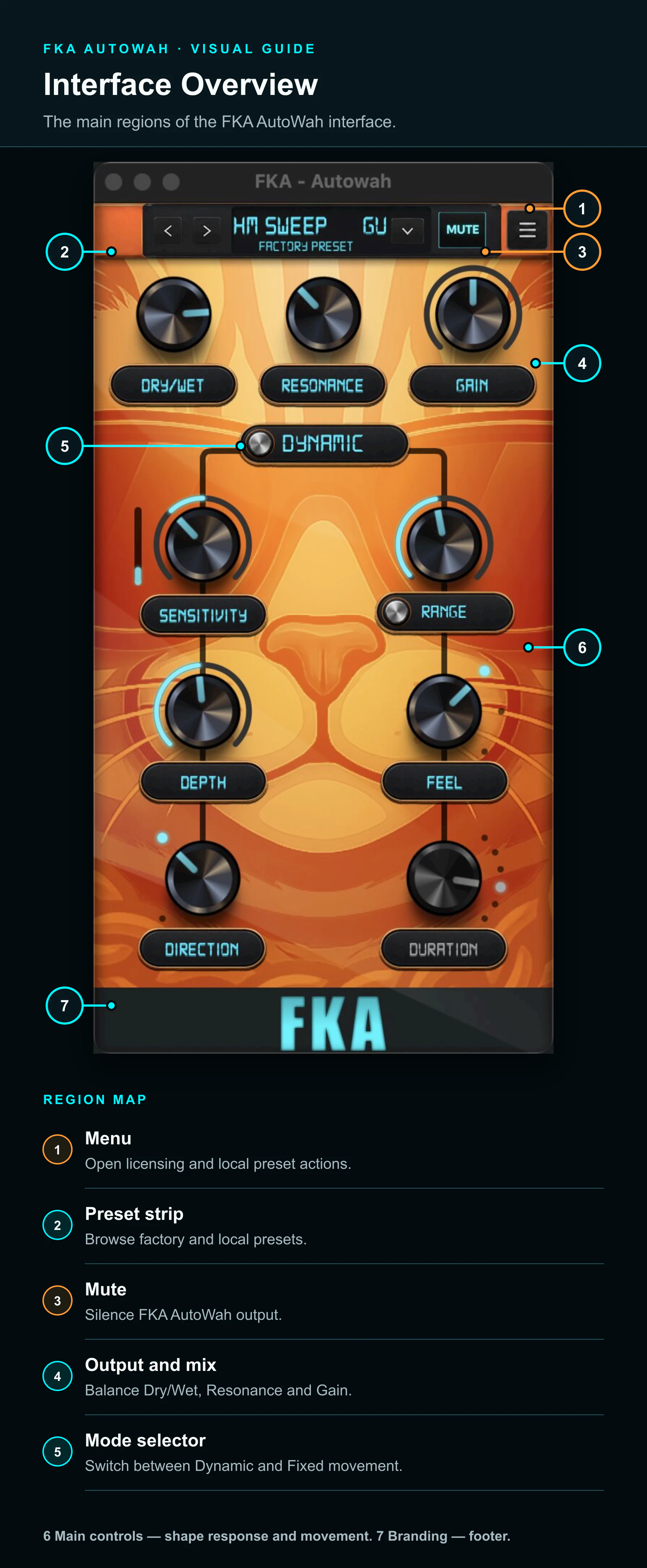
Access
Free and Pro Access at a Glance
| Feature | Free | 14-Day Pro Trial / Pro |
|---|---|---|
| Dynamic Mode | Included | Included |
| Fixed Mode | Not included | Included |
| Smooth Feel | Included | Included |
| Vocal and Snap Feel | Not included | Included |
| Up direction | Included | Included |
| Down, Down/Up, and Up/Down directions | Not included | Included |
| Sensitivity, Depth, Range, Resonance, Dry/Wet, and Gain | Included | Included |
| Factory presets | 20 Free presets | 20 Free presets plus 26 Pro presets |
Free stays Free
The complete Pro trial
Start Here
Quick Start
Dynamic Mode Quick Start
Free- 1.
Load FKA AutoWah on guitar, bass, keys, synth, vocals, brass, or another dynamic source.
- 2.
Start with a Free factory preset or the default setting.
- 3.
Adjust Sensitivity until the response follows the performance naturally.
- 4.
Adjust Depth and Range.
- 5.
Shape the result with Smooth Feel, Resonance, Dry/Wet, and Gain.
Fixed Mode Quick Start
Trial/Pro- 1.
Switch to Fixed Mode.
- 2.
Choose the timing with Duration: Sixteenth, Eighth, Dotted 8th, Quarter, Half, or Whole.
- 3.
Select Sync for consistent movement; Sensitivity becomes unavailable while the sweep runs continuously.
- 4.
Select Audio and raise Sensitivity when playing dynamics should trigger the tempo-locked response.
- 5.
Adjust Feel, Direction, Depth, Range, Resonance, Dry/Wet, and Gain.
Loading it in a DAW
Top Bar
Preset Strip
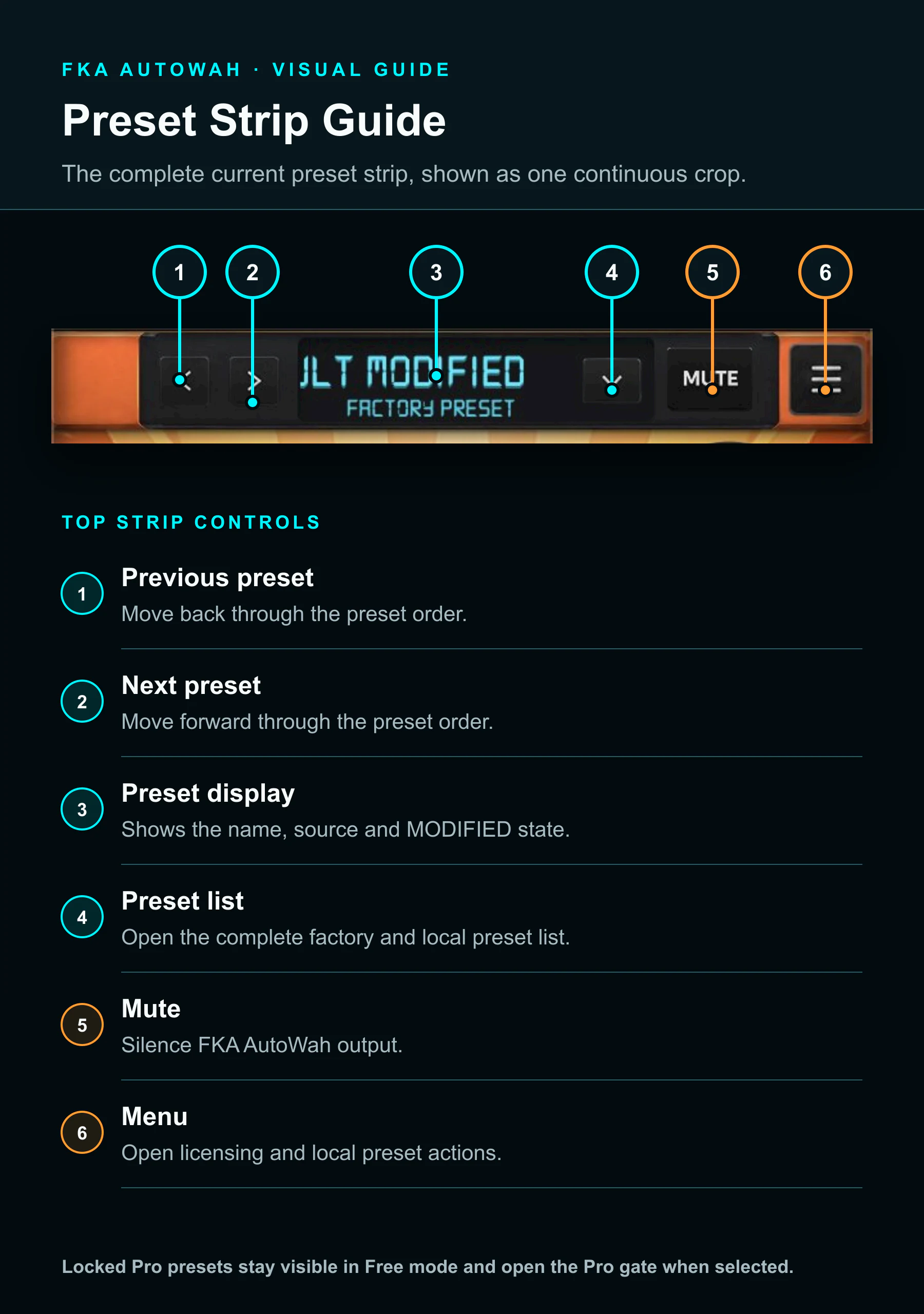
Locked Pro factory presets remain visible in Free mode. Selecting one opens the Pro gate; the guide does not depict a lock because no current-version locked-state screenshot is available.
Controls
Main Controls
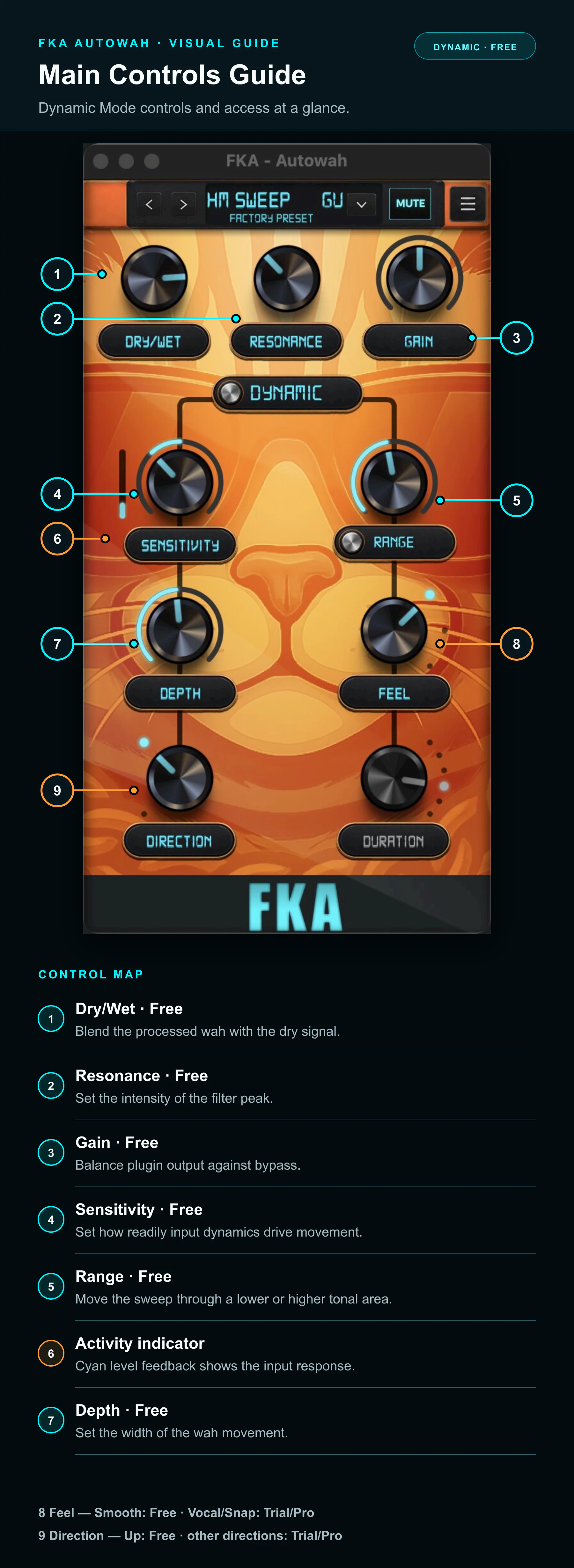
A control can appear dimmed because it is unavailable in the selected mode or unavailable under the current licence state. In the released interface, hovering over a locked Pro mode, Feel, or Direction control shows “Try this in PRO” and “Free 14-day trial”. Duration instead shows “Fixed Mode Only”when Dynamic Mode is selected.
Character
Feel
Smooth
FreeRounded movement that sits naturally behind the groove.
Vocal
Trial/ProA focused, resonant, vowel-like character.
Snap
Trial/ProBrighter, sharper, and more percussive auto-wah articulation.
Feel is a continuous control that morphs through Smooth, Vocal, and Snap rather than three separate switches. Free mode is constrained to the Smooth range.
Movement
Direction
Up
FreeMoves the sweep upward for the classic opening-wah motion.
Down
Trial/ProReverses the movement for a descending sweep.
Down/Up
Trial/ProMoves down and then up across one Fixed Mode cycle.
Up/Down
Trial/ProMoves up and then down across one Fixed Mode cycle.
Dynamic Mode exposes Up and Down. The combined Down/Up and Up/Down patterns are available in Fixed Mode. In Free mode, Direction is constrained to Up.
Modes
Dynamic Mode vs Fixed Mode
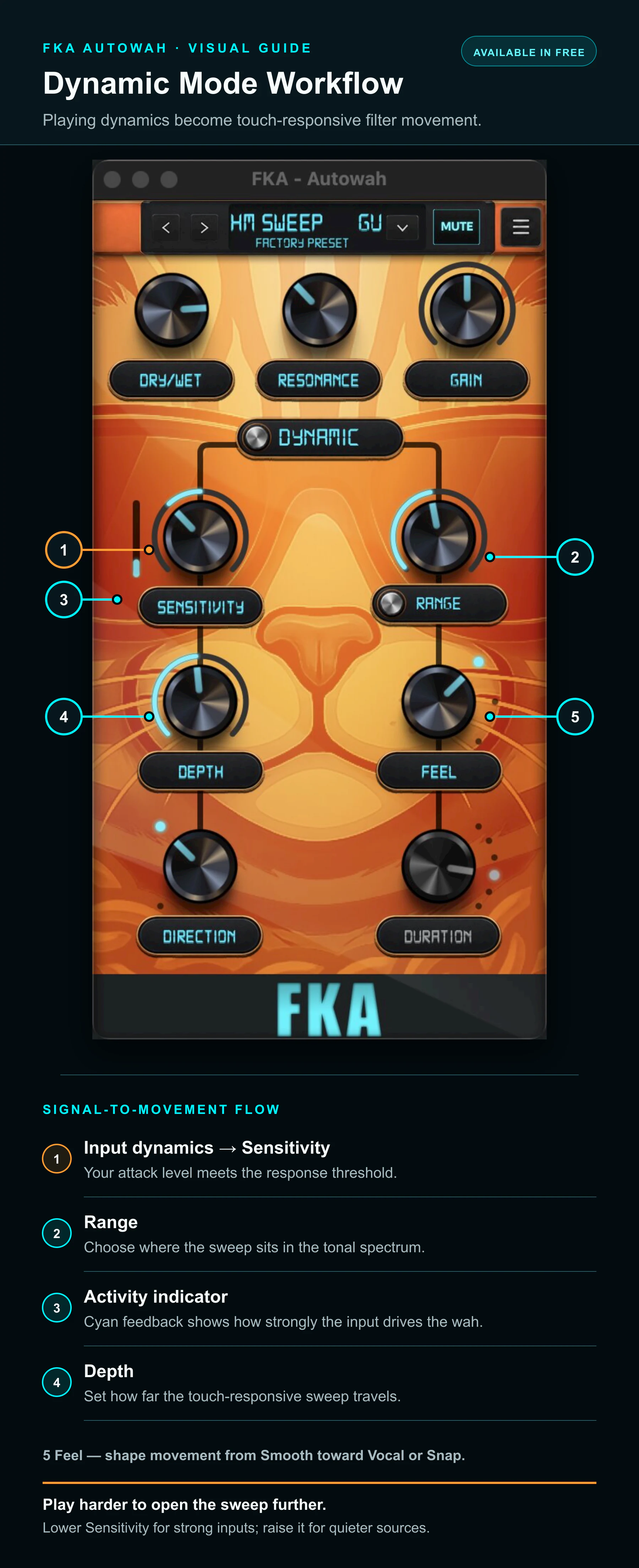
Dynamic Mode
Fixed Mode
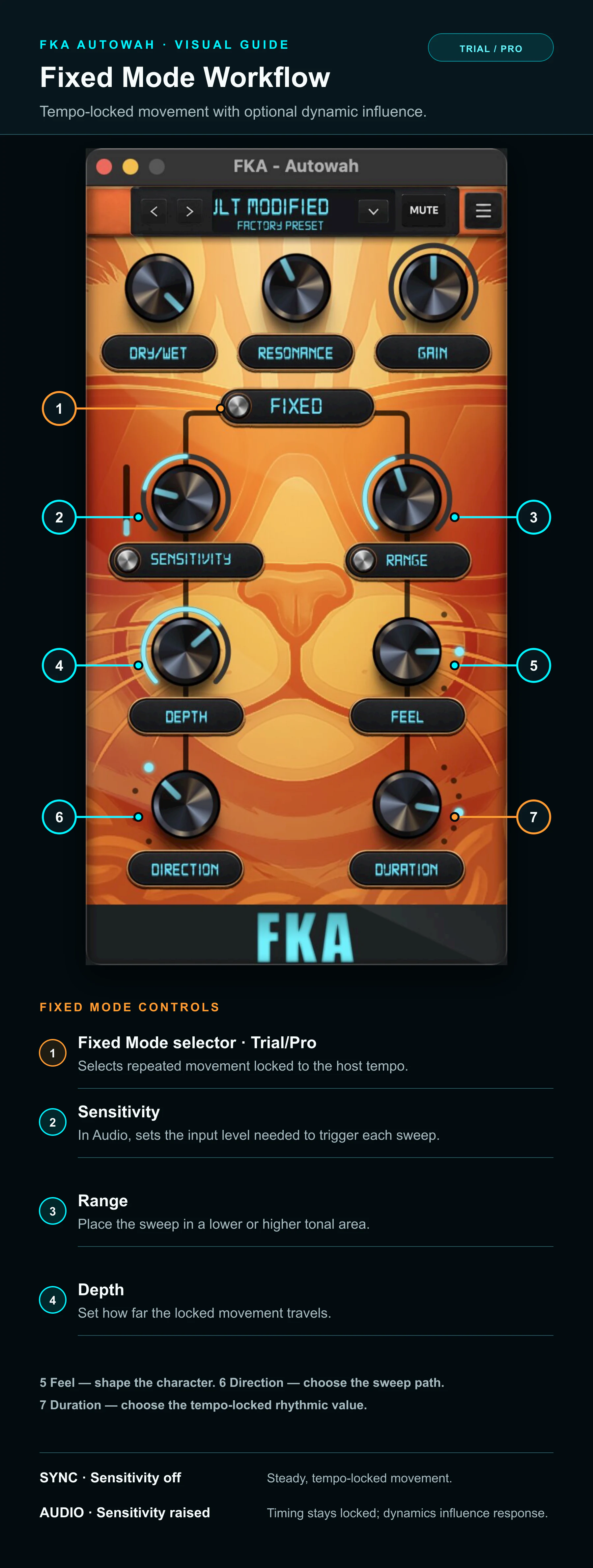
Sensitivity
Activity Indicator / Dialling In Sensitivity
The cyan activity indicator beside Sensitivity gives visual feedback as the incoming signal drives Dynamic mode.
Use it as a visual guide while you play. If the indicator barely moves, raise Sensitivity or the level feeding the plugin. If the response stays near its maximum and the wah feels jumpy, lower Sensitivity or the input level.
Aim for a response that follows your attack and dynamics rather than forcing the indicator to remain at one level.
Barely reacting?
Pinned high or jumpy?
Access
Free / 14-Day Pro Trial / Pro
Free
Free mode remains available without purchasing Pro. It includes the available Free controls and factory presets.
14-day Pro trial
The trial unlocks Pro controls, Pro-only features, and Pro factory presets for 14 days.
Pro
A purchased Pro licence keeps the full Pro feature set and Pro factory presets available on an activated device.
When the trial expires, FKA AutoWah returns to the available Free feature set. Pro factory presets and other Pro-only features remain locked until Pro is purchased and activated. Pending activation or restoration clears after the email link is opened and the plugin refreshes its licence state.
Licence
Start the 14-Day Pro Trial
- 1. Open the three-line plugin menu and select Unlock Pro.
- 2. Select Start Free Trial.
- 3. Enter your email address and select Send Trial Link.
- 4. Open the secure link sent to that email address. This activates an eligible 14-day Pro trial on the requesting device.
- 5. Return to FKA AutoWah and keep the Check Your Email panel open while it updates automatically.
Starting the trial
Already purchased Pro?
Licence
Restore Pro Purchase
- 1. Open the three-line plugin menu and select Unlock Pro.
- 2. Select Restore Pro Purchase.
- 3. Enter or confirm the email address used to purchase Pro.
- 4. Select Send Restore Link.
- 5. Open the restore link sent to that email address.
- 6. Return to FKA AutoWah and keep the Check Your Email panel open while it updates automatically.
- 7. If needed, select Use a different email / resend and request a new link.
A restore link only restores an eligible Pro purchase. It does not create or extend a trial. Always use the email address used for the Pro purchase. Trial and restore links are single-use and expire after 30 minutes. Requesting a newer link invalidates earlier pending links for that email and product.
Recall
Presets
Save and Load
Save updates the current local user preset; Save As creates a named local copy. Load opens one factory or local user preset. These actions are available in Free, but saving or loading settings that use Pro features requires an active trial or Pro licence.
Export and Import banks
Open the menu and use Export to save a preset bank for backup or transfer. Use Import to bring a previously exported preset bank into FKA AutoWah. Export and Import operate on banks, not on a single preset. Both actions are available in Free; imported presets that use Pro features remain locked until the trial or Pro is active.
Factory presets
FKA AutoWah includes 20 Free factory presets. The 26 additional Pro factory presets are included with the 14-day trial and Pro. The preset list identifies entries that require Pro.
Pro presets
The 26 Pro factory presets remain visible in Free mode. Selecting one without an active trial or Pro licence opens the existing Pro gate rather than loading it.
Back up a preset bank
Import a preset bank
Setup
Installation
macOS
- 1. Download the macOS installer from the official FunkyKatAudio website.
- 2. Run it and follow the prompts to install the AU and VST3 plug-ins.
- 3. Open your DAW and rescan AU and VST3 plug-ins if required.
- 4. Restart the DAW if FKA AutoWah does not appear.
- 5. Add FKA AutoWah to an audio or instrument track.
Windows
- 1. Download the Windows installer from the official FunkyKatAudio website.
- 2. Run it and follow the prompts to install the VST3 plug-in.
- 3. Open your DAW and rescan VST3 plug-ins if required.
- 4. Restart the DAW if FKA AutoWah does not appear.
- 5. Add FKA AutoWah to an audio or instrument track.
About Windows trust warnings
Fixes
Troubleshooting
Plugin does not show in the DAW
Confirm the installer completed, then rescan plugins in your DAW. If it still does not appear, restart the DAW and check that the DAW is scanning the correct VST3, AU, or plugin folder for your system.
No sound or unexpected output level
Check that the DAW track is not muted, FKA AutoWah is enabled, the top-strip Mute control is off, and Gain is not set too low or too high. Adjust Dry/Wet and Gain, then compare the level with the plugin bypassed in your DAW.
Mute is active unexpectedly
Select Mute in the top preset strip to turn it off. Mute silences the plugin output; use your DAW's bypass control when you want to compare processed and unprocessed sound.
Wah is not moving enough
Raise Sensitivity, increase input level, or raise Depth. The source needs enough dynamic range for Dynamic mode to respond clearly.
Wah is too jumpy or extreme
Lower Sensitivity, reduce input level, or reduce Depth and Resonance. Occasional strong triggers are useful; constant hard triggering can feel unstable.
Preset navigation does not update
Use the previous or next arrow once, then check the preset name and source in the centre display. If the display or sound does not change, reopen the preset list and select the preset again.
A locked Pro factory preset will not load
Pro factory presets require an active 14-day Pro trial or a Pro licence. Start the trial or use Restore Pro Purchase, keep the Check Your Email panel open while it updates automatically, then select the preset again.
Activation link does not arrive
Confirm the email address, check Spam, Junk, and Promotions, and wait briefly before requesting another activation link.
Restore link does not arrive
Confirm that you entered the email address used to purchase Pro, check Spam, Junk, and Promotions, and wait briefly before requesting another restore link.
Activation or restore link has expired or was already used
Request a fresh link from the plugin. Activation and restore links are single-use, and requesting a newer link invalidates earlier pending links.
Activation or restore issue
Return to the plugin after opening the link and keep the Check Your Email panel open while it updates automatically. If it does not update, check your internet connection and use “Use a different email / resend” to request a fresh link.
The purchasing email address is not recognised
Use Restore Pro Purchase with the email address used for the Pro purchase. If the purchase is still not detected, contact support with the purchase receipt details.
Saved preset or imported bank does not appear
Use Load for an individual local preset and Import for a previously exported preset bank. Confirm that the expected local file was selected and that the operation completed without an error.
Windows security warning
A browser or Microsoft Defender SmartScreen warning may appear while Windows code-signing work is in progress. Confirm that the installer came from the official FunkyKatAudio website. If the file or publisher information is unexpected, do not run it; contact support.
Help